New capability Now in beta

See everything tied to one chapter of your life — and secure it in a single pass.

Trace points Haven at a specific person, project, or period from your own life. It gathers everything connected across your email and files — then helps you lock it down. Pointed at your data, for the purpose of protecting yourself.

In beta · rolling out to Haven members · only ever pointed at accounts you connect

The problem

Your inbox remembers chapters you’ve long since closed.

People carry chapters of their lives in their inboxes and drives for years without realising it. A consulting gig. A legal matter. A former employer. A medical episode. A previous name. All of it sits scattered across thousands of emails and files — contracts, attachments, threads, shared folders — long after the chapter itself has closed.

Haven’s standard scan finds universal categories of sensitive data. But only you know that a particular six months, or a particular person’s name, is something you’d want to find and secure before someone else goes looking.

A consulting gig, 2021 A legal matter A former employer A medical episode A previous name
How it works

Describe it in your own words. Haven does the rest.

Four steps — from a plain-language description to a whole cluster cleaned up at once.

01

Define

Type what you’re after — a period, project, person, or topic — and add any names, addresses, or phrases that matter.

02

Investigate

Haven reads across the accounts you’ve connected and gathers every related item — not just keyword matches, but things connected by context.

03

Review

A plain-language summary, then a list of everything found — marked by how strongly each item relates and where it lives.

04

Remediate

Clean up the whole cluster in one pass — revoke external sharing, move to an encrypted vault, or delete. Reversible for 30 days.

Screen 1 · Define

Start an investigation in plain language.

Describe what you’re looking for, choose which accounts and time window to search, and pick how deep to go. Before anything runs, Haven shows an honest estimate of the work involved.

Haven — Trace
New investigation
Everything connected to my Meridian consulting engagement in 2021 — contracts, invoices, and anyone I shared documents with.
Meridian Advisory 1099 keith@meridian.example + add term
alex.rivera@gmail.com
Google Drive
This device
Outlook
All time 2021
Fast Deep · contextual
Estimated: ~1,180 items · 3 accounts · about 4 min Run Trace

Trace only searches accounts you’ve connected. Nearly all of the work happens on this device; only small, redacted excerpts of genuinely ambiguous items are checked off-device — and every one of those is listed in your Network Activity log.

Screen 2 · Review & remediate

A plain-English summary — and one-pass cleanup.

Haven leads with what it found, then lists every item marked by how strongly it relates and where it lives. Select and act in bulk with the same controls you use everywhere else in Haven. Note the third row — found by context alone, in a thread that never names the project. Ordinary search can’t do that.

Haven — Trace · Results
Investigation complete
Meridian engagement · 2021 · 3 accounts
Summary

Haven found 41 items tied to your Meridian consulting engagement. 6 are still exposed outside your control — including a signed contract and a tax form shared by link. The rest are stored privately. You can revoke, vault, or delete the whole cluster below.

41 items 6 exposed 3 accounts
Findings showing 4 of 41
Revoke sharing Move to vault Delete
A signed consulting agreement is still shared with three external recipients
Directly relevant · external link sharing on · one PDF attachment
Critical Gmail · 5 yrs old
A tax form reporting income from this engagement is shared by public link
Directly relevant · “anyone with the link” · 9 views
High Google Drive · 5 yrs old
An email thread discussing the engagement’s wind-down, without ever naming it
Related · no keyword match · found by context
Medium Gmail · 5 yrs old
Kickoff notes for the project sit in a folder three collaborators can still open
Related · shared folder · 3 collaborators with access
Low Google Drive · 5 yrs old

Findings describe what a file is, never what it says. Every action here is reversible for 30 days.

Context, not keywords

It finds what search can’t.

Trace surfaces the thread that refers to a project obliquely and never uses its name — because it works from what you described, not from string matching. It runs on the same three-tier inference Haven already uses everywhere else: patterns and an on-device classifier first, with a narrow second-opinion tier for the genuinely ambiguous cases.

Find & fix

It doesn’t just find — it fixes.

Finding items is half the job. Select the whole cluster and act on it at once — archive it or move it to trash in one pass, every action reversible for 30 days from your Remediations log. Pulling back externally shared files and an encrypted vault are next on the list.

Ask your Trace

Then ask questions of what you found.

“What was my tax bill for 2022?” — once a Trace finishes, ask it directly. Haven re-reads the most relevant items transiently and answers with citations back to the exact messages the answer came from. Nothing is stored; your mailbox stays the only copy, and if the answer isn’t there, Haven says so instead of guessing.

Auditable by construction

What it did is what you can see.

Every provider search a Trace runs and every model check it makes lands in your Logging tab, verbatim, as it happens. There is no hidden step — the record of what left your machine is the mechanism, not a promise.

New · Ask your Trace

Then ask questions of what you found.

A finished Trace isn’t just a list — it’s something you can interrogate. Ask in plain language — “what was the final invoice?”, “when did we sign?” — and Haven picks the most relevant items, re-reads them transiently, and answers with citations back to the exact messages the answer came from, each one a click away.

Nothing is stored to make this work: your mailbox stays the only copy. The checking happens as short, redacted excerpts on GPU infrastructure Haven operates end to end — never retained, never trained on — and every fetch and model call is listed in your Logging tab as it happens. If the answer isn’t in what was checked, Haven says exactly that instead of guessing.
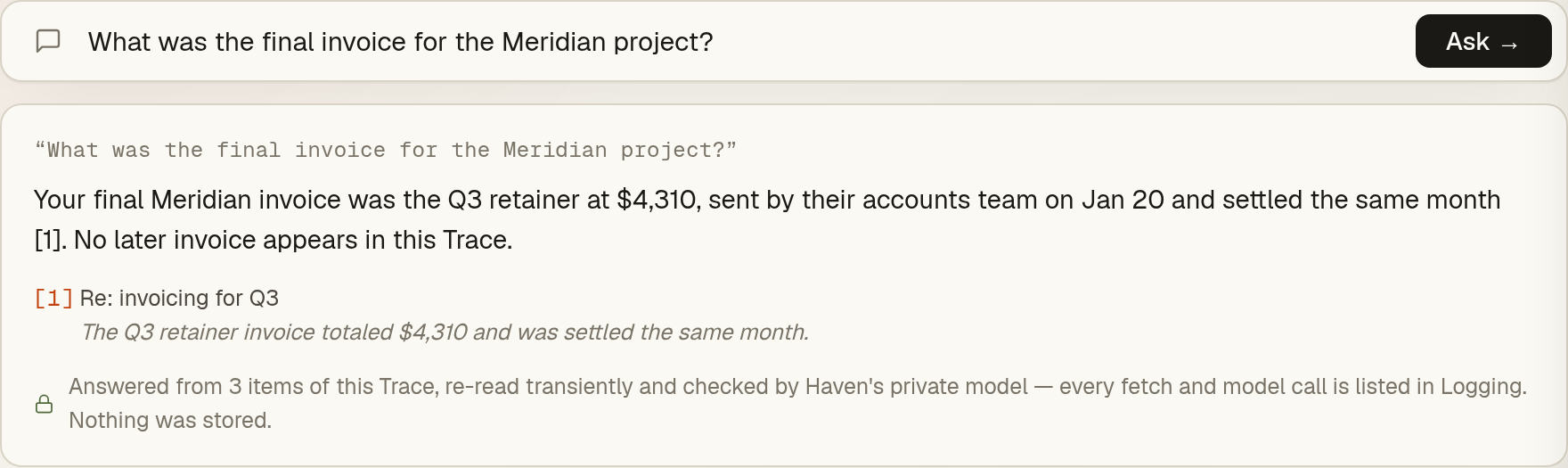
Haven — Trace · Ask
Asking a completed Trace a question: the answer cites the exact message it came from, with a note that nothing was stored
Now in beta

Find the chapter before someone else does.

Trace is live for Haven beta members — describe-it-in-your-words search, contextual Deep search, and asking questions of your results all shipped. Join the beta and it’s yours to run.

Only your connected accounts · on-device first · every action reversible for 30 days