What 'anyone with the link' sharing really exposes in your cloud drive
A single shared link from 2018 can act as a permanent, unmonitored back door into your personal files and the sensitive data they contain.
A single click on a blue ‘Share’ button in 2018 can create a permanent, unmonitored opening in your digital perimeter that remains active in 2024. When you select the option to share with ‘Anyone with the link’, you are effectively removing the identity layer of your file’s security. This mechanism does not require a recipient to log in, meaning the cloud provider cannot verify who is accessing the data or where that link might have drifted over the intervening years.
The persistence of unauthenticated access
Cloud storage providers like Google Drive designed the ‘Anyone with the link’ feature to reduce friction for collaborative tasks, such as sharing a large photo album or a public-facing document. According to Google’s documentation, when this setting is active, the file does not require a Google Account for access. This is a deliberate design choice, but its long-term consequence is the creation of a ‘shadow’ permission set that persists long after the original reason for sharing has faded.
We often see this manifest in folders shared for a specific life event—a wedding, a home purchase, or a group trip. At the time, the convenience of not managing individual email addresses outweighs the perceived risk. However, as these folders age, they tend to become ‘junk drawers’ for sensitive digital artifacts. A folder originally shared to distribute trip photos might later receive a scanned copy of a passport (████████) or a rental agreement because it was the most convenient place to drop a file while on the move.
Because the ‘Anyone with the link’ setting is inherited by files added to a shared folder, the sensitivity of the exposed data often scales upward while the user’s awareness of the exposure scales downward.
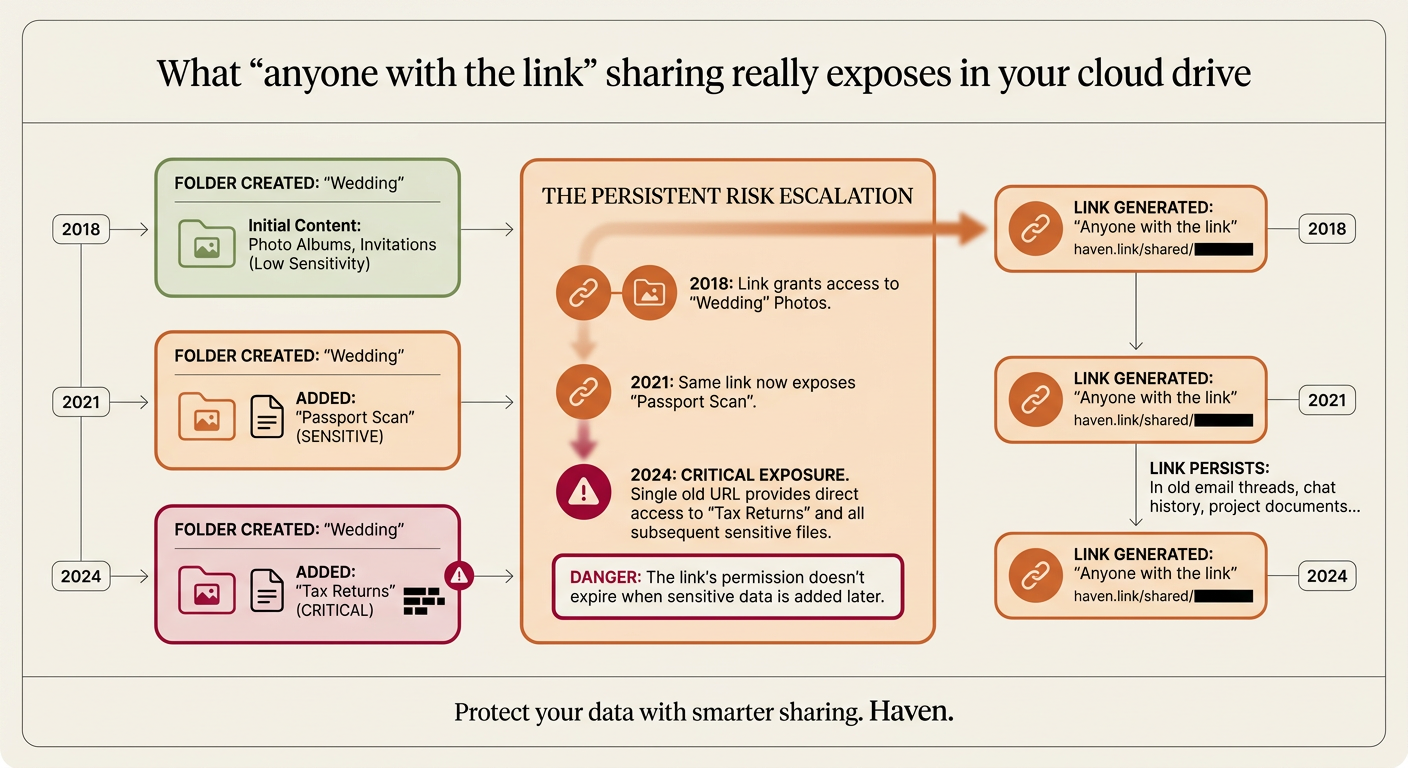
The link is out there, perhaps buried in an old WhatsApp thread or an archived email, and it remains a functional key to whatever is currently inside that directory.
Why these links stay active indefinitely
There is no ‘expiration’ default for most consumer-grade link sharing. Once a link is generated, it remains valid until a human manually intervenes to change the sharing settings or deletes the file. This creates a structural mismatch between how we think about sharing—as a temporary event—and how the software executes it—as a permanent state change.
We find that users rarely audit their sharing settings because the cloud interface prioritizes the creation of new shares over the management of old ones. To see every file you have shared with a public link usually requires clicking through individual file properties or using advanced search operators that the average person has no reason to know. This lack of visibility is why a link sent to a realtor five years ago can still provide access to a folder that now contains your updated tax returns or sensitive financial statements.
Furthermore, these links can be indexed by search engines if they are ever posted on a public-facing site, or they can be intercepted if sent over unencrypted channels. While the URL itself is a long string of random characters, it is a ‘bearer token.’ Anyone who holds it is granted the permissions associated with it, no questions asked.
Identifying the high-risk artifacts
When we look at what is actually exposed in these legacy shares, the patterns are consistent. It is rarely a single document that poses the threat; it is the aggregation of identity data over time. In our internal testing and development of Haven, we look for Tier 1 deterministic patterns—specific strings like Social Security numbers or credit card formats—that shouldn’t be in a public-facing folder.
For more complex items, such as a blurred photo of a driver’s license or a tax document that doesn’t follow a strict regex pattern, we use a multi-tiered classification system. Tier 2, our on-device classifier, handles the majority of these detections locally. For the roughly 0.8% of cases where the local model cannot reach a confident verdict, Haven uses a Tier 3 ‘second opinion.’
Where this Tier 3 logic runs is decided at install time: if your hardware passes a 30-second performance benchmark, it runs on your own GPU. If not, it uses Haven’s cloud GPU infrastructure — an open-weights model on hardware Haven operates end-to-end. In the cloud scenario, we send a bounded excerpt of no more than 2 KB in a single round-trip. This excerpt is discarded immediately after the verdict is returned. Every one of these calls is logged in your Network Activity log, ensuring that the ‘audit’ of your data doesn’t become a new source of unmonitored exposure.
How to regain control of your drive
The fix for ‘Anyone with the link’ exposure is straightforward but requires a systematic approach. You cannot simply trust your memory of what you shared; you must look at the metadata the cloud provider stores.
- Audit the ‘Shared’ view: Most providers have a ‘Shared’ tab, but this often shows files shared with you. You need to search for files owned by you that have specific visibility settings. In Google Drive, you can use the search operator
is:publicorto:me(though these are often insufficient for finding link-shared files specifically). - Revert to Restricted: Google recommends changing the link settings to ‘Restricted.’ This ensures that only people specifically added by their email address can access the file, even if they have the original link. This is the most effective way to ‘kill’ a legacy link without deleting the file.
- Move sensitive data to the root: If you have a folder that must remain shared with a link for some reason, ensure that no sensitive documents are stored within it. Move your identity documents, financial records, and private notes to a non-shared root directory.
Once you have reverted these settings, the ‘bearer token’ in that old email or chat log becomes useless. The server will challenge any visitor for an identity, and unless they are on your explicit allow-list, access will be denied.
What remains true after the fix
Securing your links does not mean your data is suddenly ‘encrypted’ in a way the provider cannot see—it simply means you have re-established the boundary of who else can see it. Your cloud provider still holds the keys, but you have closed the back door you accidentally left unlatched years ago.
By moving from ‘Anyone with the link’ to ‘Restricted,’ you transition from a security model based on ‘possession of a secret URL’ to one based on ‘verified identity.’ This is a fundamental upgrade in your personal security posture. Even if an old email account of a friend is compromised, the attacker cannot use the old links found in their inbox to pivot into your current personal files.
Our goal with Haven is to make this audit continuous rather than a one-time chore. By running deterministic and on-device classifiers across your messages and files, we identify these exposures as they happen, ensuring that a ‘temporary’ share doesn’t become a permanent vulnerability.